Help using pompeiiinpictures
Help topics
Please click on one of the links below to see the help available.
Some of these links will take you to specific pages of the web site from where you can carry on through the web site.
To get back to help at any time you can click on the Help button which is on every page.
The structure and approach of the site
Glossary of Latin terms with Italian equivalent and English meaning.
Finding a house by name using the index
How to email pompeiiinpictures
Do you have pictures you can send to us?
How to send your pictures to us
Right to publish or remove pictures
Welcome to pompeiiinpictures
Pompeii has always intrigued me. Having read many books on the ancient city, I had found it most confusing when, for example two different books gave a differing location for the same property. Many of the books only contained photos of the same well visited houses. None showed the smaller homes and houses, which seemed ignored but just as interesting.
With my husband as photographer I have tried to build a photographic record indicating all the doorways of houses, shops, temples, workshops, bars and ancient pubs as a way to clear the mystery once and for all.
In using this site you can see Pompeii as it really is.
The structure and approach of the site
The pictures on this site correspond with the numbers on the doorways and the Pompeii Plan of Excavations (Autore Dr. Ing. Hans Eschebach) which you can buy for 11 euros in the bookshops next to the ticket offices at Pompeii.
Every property (house, caupona, workshop, shop, tomb, sepolcri, villa, gate, tower etc) has its own web page based on the standard regio . insula . house number such as IX.11.1 used for the excavations at Pompeii. For a detailed explanation of numbering click here
The regio . insula . house numbers given on a web page or plan correspond to the numbers on the doorway, on the plan and onsite. Using our 80,000 photographs, comparing the photographs of the numbers, the property either side or behind and matching the edges of the photographs we believe the house numbered photograph pages are a highly accurate record of what is on the ground. There will no doubt be occasional difficulties where one house merges into another with no easily spotted boundary.
The house names have however been gathered from a number of sources and there are bound to be discrepancies. You will find the same house may have many different names or has been renamed or referred to by different names, accurately or inaccurately, over the last few centuries. Not all houses have names.
If it is important to your research, you should check the accuracy for yourself.
Remember throughout this pompeiiinpictures site that its name and email addresses have three iii and no spaces.
The site has been designed for a screen resolution of 1024 by 768 and to meet the standard of a maximum of 30 seconds load time using a 56k modem. As it is a picture site this has not always been possible and a few pages may be a little slower than this.
All pictures are reduced to the web resolution for publication.
Finding your way around pages
The web pages are arranged in layers with clickable plans to make them easy to use.
Please click on the pompeiiinpictures plans or, if you prefer, the links below the plans.
The main plan is on the home page. Clicking on any regio (I to IX and Villas and Sepolcri) will take you to next level down which is a plan of that regio.
On each regio plan you can click on the number of the insula that you want. This will take you down to the next level which is the insula plan.
On the insula plan you can click on the number or letter of the house that you want. This will give you the photographs of that house.
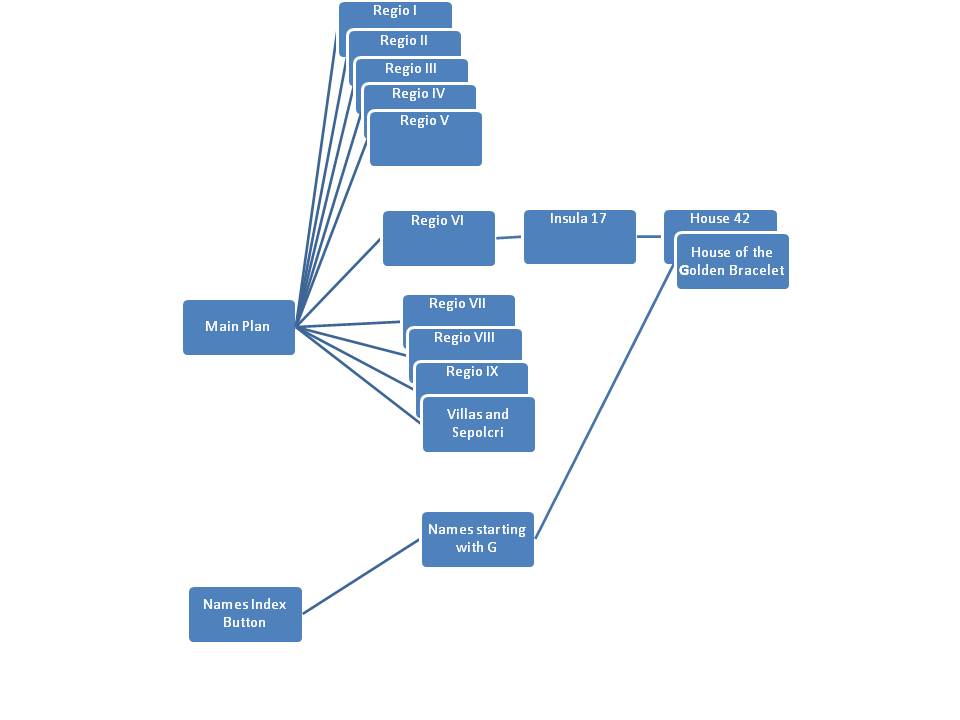
If you know the name of the house you can:
Click on the House Names button on the top of any page,
Click on the first letter of the house name (Ignore the House or Casa part of the name). This will give you the page for houses of that letter of the alphabet.
Then find the name in the list and click on the link to the right of it.
pompeiiinpictures sites
There are several copies of the pompeiiinpictures site
www.pompeiiinpictures.net is no longer available.
If you have a reference to pompeiiinpictures.net simply change the net to org and use pompeiiinpictures.org.
The content is identical on all of these, though during the time it takes to carry out updates one may lag behind the other for a short period.
These sites are hosted separately and the hosting providers support for software is different.
herculaneuminpictures sites
We also now have HerculaneuminPictures sites
Menu buttons
We have redesigned the menu system on all pages.
The menus are now only at the top of the page and occupy less space.
The Pompeii button will give you a link to each regio and all the pages related to Pompeii
The Surrounding button will give you access to all the villas and remains in the areas surrounding Pompeii such as Boscoreale, Boscotrecase, Stabiae, Oplontis, Gragnano, Scafati etc
The Find button will give you access to the search page, the index of names used on pompeiiinpictures, the explanation of Roman naming, and the glossary of terms.
The Help button will get you to the Help page, to an explanation of Pompeii house numbering and our Contact Us page.
Clicking on a button will bring down the menu, which will stay down until either you click on an item in that menu or click on another menu or click back on the top of the menu to close it.
The new menus are more mobile and tablet friendly.
They no longer take up a chunk of the left side of the screen or wrap round at the top of the screen, leaving those areas free to show more of the photos and text.
On plan pages the links are to the left and narrative to the right
Very occasionally only, you may want to turn your phone 90 degrees to get a better fit.
On some plans pages the original plan is still large but the links below it are arranged to fit on a mobile screen without needing to be enlarged, reduced or wrap round.
The back, up, down and home button group is no more sadly, as the feature is no longer available in the software we use.
Don't forget that you can use the browser back button to get back to the previous page or plan without using the menus.
Our old menu software has been discontinued and as a result the old menus no longer worked properly on mobile and tablet devices.
In some browsers the old menu may come up the first time you use some pages and this can be cleared by refreshing the page using the browser's refresh or reload page button that usually looks like a three-quarter circle with an arrow on one end.
On your keyboard you also have a Home key and an End key.
These are usually in a group of keys towards the right hand end of the keyboard.
Pressing the Home key will take you to the top of the web page.
Pressing the End key will take you to the bottom of the web page.
Plans
The plans on this site have mostly been drawn by us. To avoid the minefield of copyright, permissions, or the difficulties and delays of finding plans in the first place we have drawn our own. The plans and the room descriptions on our photographs reflect "Pompeian North" which Dobbins and Foss define in their glossary as "the modern simplification of compass points based on the location of Vesuvius in relation to Pompeii". Most, but not all, plans are oriented with north to the top.
The house plans are generally based on the 1983 Eschebach plan. We also consult the plans published by Van der Poel in C.T.P., Liselotte Eschebach in 1993, Jashemski in 1993, Andrew Wallace-Hadrill in 1994, Pompei: Pitture e Mosaici: volumes from 1990-2003 and Dobbins and Foss in 2008. Individual plans can also come from a wide variety of sources including old excavation records. They often differ widely in their interpretation of what is a door or window or where houses start and finish. To these plans we add any changes we may find on the ground when we visit.
Our plans are simply for guidance, intended to clarify which rooms our pictures relate to. They are in no way to be regarded as accurately surveyed or to use the same room numbers as other plans to which we cannot get access, though we do use these where we can. Doors and windows may have fallen down, suffered earthquake damage, been bombed or have previously been inaccurately recorded or were simply inaccessible and unrecorded. This makes it difficult to be accurate as to some features in a relatively few cases.
We should therefore issue a health warning, namely that you should check back to original sources if it is important to you.
Picture use
These pictures are for private study and academic or not for profit use and we make no charge for any of our pictures.
Pictures used should have one of the following citations:-
If there is no name underneath the photo use the citation
© Jackie and Bob Dunn, www.pompeiiinpictures.com
Su concessione del MiC - Parco Archeologico di Pompei.
If there is a Photo courtesy of A Name shown somewhere underneath the photo please use the citation:-
Photo © A Name
Courtesy of Jackie and Bob Dunn, www.pompeiiinpictures.com
If you wish to use the pictures please email us at the email address on the contact page.
Pictures must not be used for commercial purposes without obtaining the permission of the Ministero della Cultura - Parco Archeologico di Pompei.
Pompeii numbering system
We have used the standard numbering system used for the excavations at Pompeii to reference each house, shop or workshop on this web site. This will help you tie in with the site plans and other documentation more easily.
You should also be aware that the numbering system in Pompeii has changed a number of times over the years, so what is recorded in the excavation journals or older books may now have different numbers.
For an explanation of the numbering system click here
Glossary of Latin terms with Italian equivalent and English meaning.
We have included a glossary of some of the Latin terms used in connection with Pompeii that may be relevant to this web site.
This lists the Latin terms in alphabetic order, their Italian equivalent, and their English meaning. Their singular and plural forms are also given.
The inclusion of Italian is intended to help with many of the sources for study which are of course in Italian.
Our thanks to Michael Binns for providing this comprehensive glossary.
For the glossary click here
Finding a house by name using the names index
This index is based on the full names in a house, villa, bar or tomb name, in Pompeii or surrounding towns and areas. You will find the same house may have many different names or has been renamed or referred to by different names, accurately or inaccurately, over the last few centuries. Not all houses have names. Where there are nameplates on the houses themselves we have used these but most have no nameplate on them.
Many of the index entries have been collected from various books each of which may have discrepancies, disagreements or differences according to the view or language of the author. We have not checked these out and feel the index will be more useful with more entries in than less. If it is important to your research you should check these out yourself. The numbers given in the index correspond to the numbers on the doorway, on the plan and onsite.
For the index of names used on pompeiiinpictures click here
Roman Personal Names
The names of Roman citizens originally had a basic format very similar to that of modern English names, as in Gaius Marius, having first a personal name and then the family name.
However, as time passed, some additional features were added to the end to show wider family relationship and origin.
This page gives an explanation of the structure of Roman Personal Names of Men, Women, Adoptions, Slaves, Freedmen, the abbreviations used, the tribes, Patricians and Plebeians, Roman Social Classes and the career structures in public life.
For an explanation of Roman Personal Names click here
How to email pompeiiinpictures
If you wish to send email from your own email programme send it to
jandb @ pompeiiinpictures.com (with no spaces around the @)
You can of course attach pictures to your email.
If you have several pictures, paintings or sketches see "How to send your pictures to us" on this page below.
Do you have pictures you can send to us?
We are particularly interested in any pictures that add new views or information to the site or show features no longer in existence or provide a comparison with how a particular part of the site used to look.
This could include any photographs of items no longer in situ.
Format should be JPEG with little or no compression.
Resolution should be as high as possible in order to allow us to use zoom to match features if we need to identify where they are in Pompeii.
If possible please let us know as much information as you can on
Approximately when they were taken
Where you think they are located in Pompeii
The regio.insula.house number if you know it or if not then as much as you do know
Your name and confirmation that you own the copyright
Your agreement that we can publish them on the site.
We will always acknowledge you under each photograph used, normally in the form "Photograph courtesy of Your Name".
How to send your pictures to us
You can use ordinary email for sending pictures to the email address on our contacts page. Email suppliers typically have a limit of 10mb per email. This can be cumbersome where a single picture from a current digital camera may be this size and you will need several emails to send pictures.
There are several free large file size services available such as www.dropbox.com which has free accounts with up to 2gb.
We have successfully used WeTransfer.com many times which allows free tranfers up to 2gb of files, folders or zip files. www.wetransfer.com
If you want to send us a large number of pictures please contact us first and we may be able to help.
Right to publish or remove pictures
We do reserve the right to publish or not to publish or to remove pictures if circumstances require.